Closing the cash drawer at the end of the day
Count what is in the drawer, check it against what you recorded, and know the shortage or over before you lock up.
Why doesn't the drawer match the book?
The drawer doesn't match the book
You count the cash at closing and get a different figure from the book, with no idea where the gap came from.
An expense nobody recorded
A delivery fee paid from the drawer or the wrong change, and a shortage shows up with no reason you can find.
Yesterday's numbers change
An edit or a crossed-out line in the notebook or a spreadsheet changes a day you thought was done.
How you close the day in Taqfil
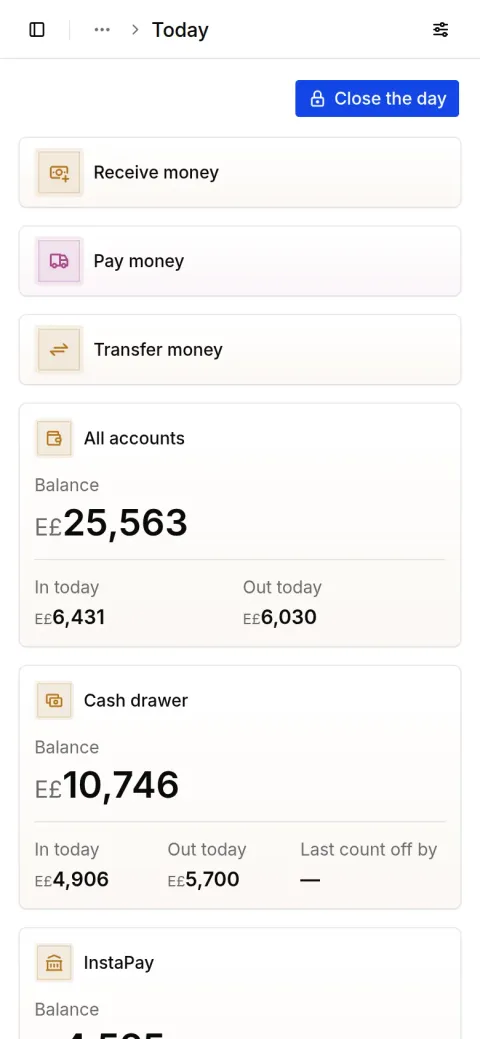
Every sale, payment and expense lands in its account as it happens, so at closing you know what each cash drawer should hold.
Count the cash
On the Money screen press “Close the day” and type what you counted in each cash account.
See the difference
Taqfil shows what each account should hold beside your count, and the difference between them, short or over.
Close the day
The difference is recorded on its account under the name of whoever counted it, and no money movement recorded before the close can be voided after it.
Questions about closing the drawer
Have a question? Message us on WhatsApp
What if the drawer is short or over?
The difference is recorded on that account, so its balance becomes what you counted, and you can see who counted it and when.
Can I close the day from my phone?
Yes. Taqfil opens in the phone's browser or on a computer, and closing takes the same steps on either.
What about InstaPay and wallets?
Each account keeps its own balance. You count the cash in each cash account; InstaPay and wallet balances come from their own movements.
Can I change a day I closed?
No money movement recorded before the close can be voided. If one was wrong, record a correction today, so what happened stays clear.
Record your next day in Taqfil
Sales, purchases and your cash in one place, on your phone or computer.
With your Google account
Have an account? Sign in
Have a question? Message us on WhatsApp
Sale recorded
Al Huda Real Estate
E£640
Payment in on Vodafone Cash
From Al Huda Real Estate
E£640
Day closed
Cash matches your count
E£4,000