Invoice software for your shop
Pick the customer and the items and the sales invoice comes out with its total. Print it or send it to the customer, and what they still owe stays on their account.
Why an invoice book isn't enough
Handwritten invoices and wrong sums
You write the items and prices by hand and add them up, and one slip in the sum costs you or the customer.
The copy gets lost
A customer comes back a month later asking about their invoice, and you search the books for its copy and can't find it.
You can't tell what the customer still owes
They paid part and part is left, and the invoice in the book doesn't say what they paid afterwards.
How to make a sales invoice in Taqfil
The invoice adds up its own total and stays in your sales under its number, for whenever you need it.
Record the sale
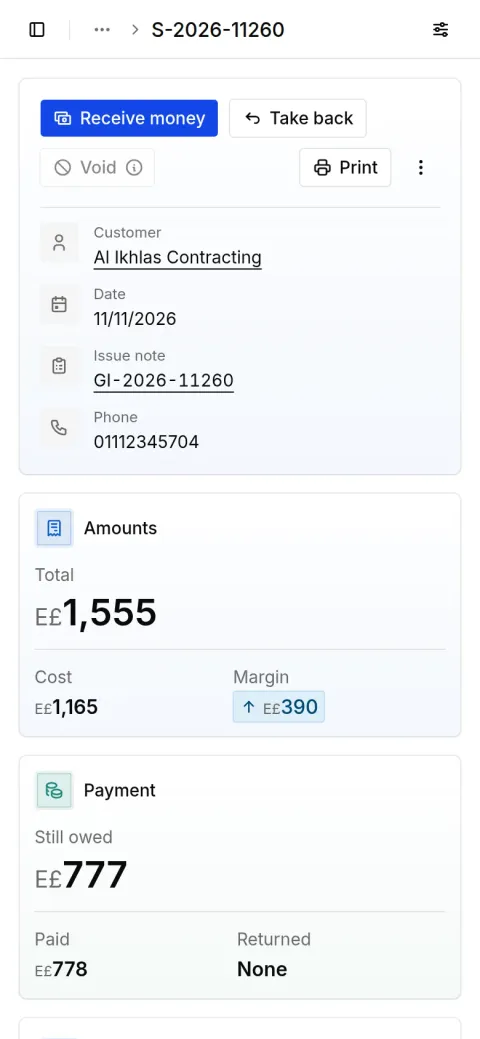
Press “Record a sale” and pick the customer and the items; each item's price and the total appear. Enter a discount if there is one and what the customer paid, and the rest stays owed on their account.
Print the invoice or download a PDF
On the sale's page press “Print” to print the invoice with your shop's name and logo, or “Download PDF” to keep it.
Send on WhatsApp
Press “Share by link”, then “Make a link”, and send it to the customer on WhatsApp so they open their invoice on their phone. “Stop this link” turns it off whenever you like.
Questions about invoice software
Have a question? Message us on WhatsApp
Is it a tax invoice or an e-invoice?
No. It is your shop's own invoice for your customer, not the electronic invoice filed with the tax authority.
Can I send the invoice on WhatsApp?
Yes. Make a link to the invoice from its page and send it on WhatsApp, or press “Download PDF” and send the file.
Can I sell on installments?
Yes. On the invoice's page press “Installments” and choose how many payments and when the first is due. Every installment shows under “Installments”, with what was paid and what is late.
How do I record a return?
On the invoice's page press “Take goods back” and pick what came back. It returns to stock and comes off the customer's account.
Does it work on a phone?
Yes. It runs in the browser on a phone or a computer, and installs on your phone like any app.
Can I write a quote before the invoice?
Yes. Press “Write a quote” and send it to the customer; once they accept, it becomes their order.
Record your next day in Taqfil
Sales, purchases and your cash in one place, on your phone or computer.
With your Google account
Have an account? Sign in
Have a question? Message us on WhatsApp
Sale recorded
Al Huda Real Estate
E£640
Payment in on Vodafone Cash
From Al Huda Real Estate
E£640
Day closed
Cash matches your count
E£4,000